

QORLYNTQORLYNT
Menu
YOUR DAY. YOUR QORLYNT.

What would you like to make easier?

A salon appointment, a callback request at a workshop, a personal birthday greeting: explore practical workflows for your business and the features behind them.

FROM YOUR WORKING DAY

Your business. Your example.

From a salon to a mobile service: explore a workflow that fits your business.

Illustrative example · no live data

While you look after a customer, the next appointment takes shape.

The starting point

“I’d like a haircut with Mara. What’s available on Friday?”

01 / 03

Service & preferred person

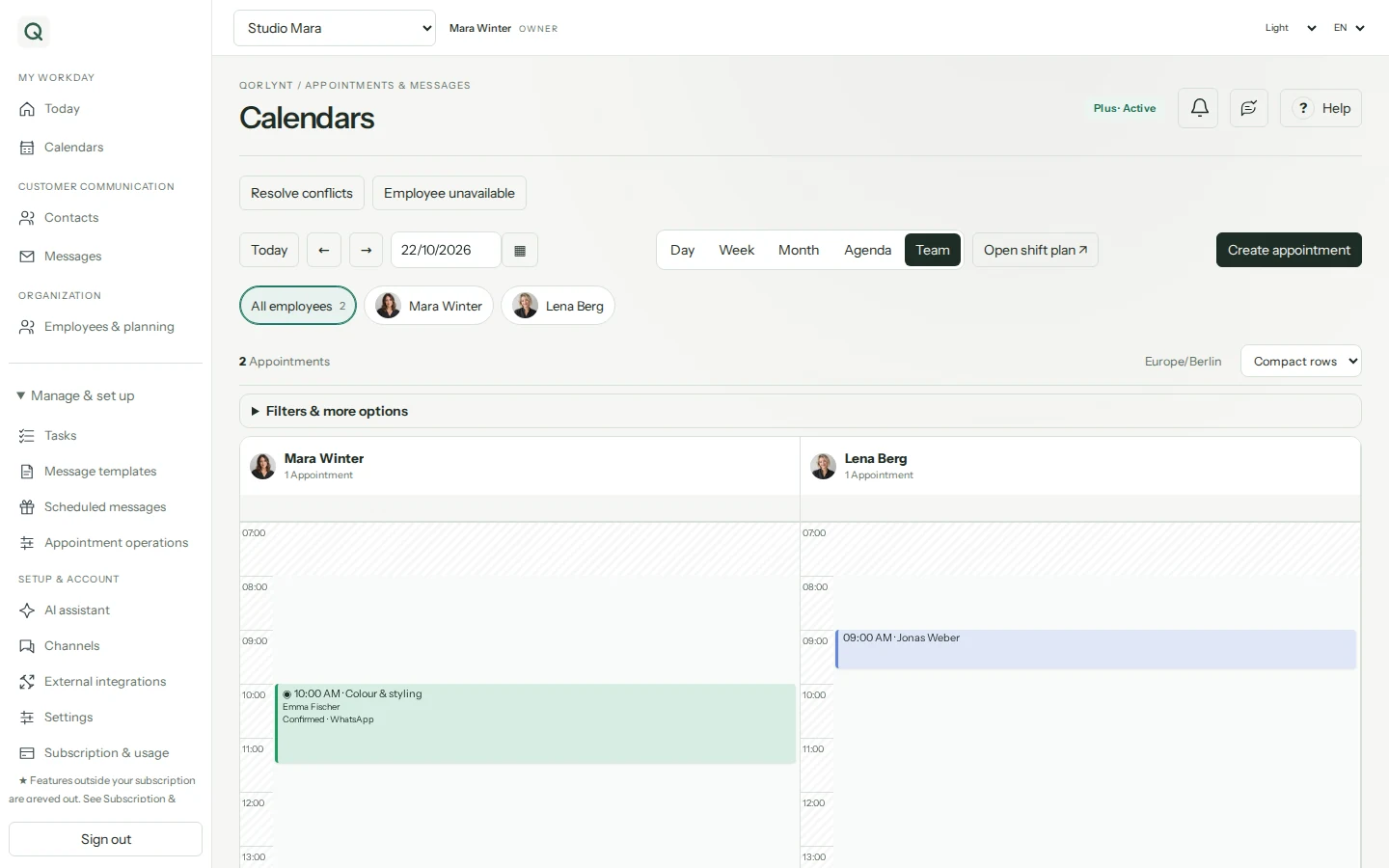
Customers choose a service and employee. The available times match that selection.

QORLYNTRelated workspace
Current QORLYNT calendar with employee filters and fictional appointmentsCurrent QORLYNT calendar with employee filters and fictional appointments
Real QORLYNT interface · fictional example data
The result

A clear booking process for your customer and team.

Set up this workflow ↗

Staff bookings require Plus. Set up approval and notification rules first.

These examples are a starting point. Your best plan also depends on contacts, message volume, AI usage and team size. The plan advisor considers your requirements.

01Your starting point · Pro

A customer books an online consultation. Your team needs a notification and the CRM needs to stay current.

Consulting & CRM · One connected workflow

The Google booking link opens the correct location. After confirmation, QORLYNT creates the Meet or Teams meeting. An event updates the CRM through Make or n8n; a callback request can flow from the CRM back to QORLYNT.

  1. 1Choose the location and online service
  2. 2Confirm the appointment and send its meeting link
  3. 3Notify the CRM and Teams channel

What changes in your day: Appointments, staff and customer records stay connected through traceable actions.

Set up connections, permissions and consent first. The Teams bot can process a callback in personal chat using your granted permissions.

02Your starting point · Basic

A regular customer has a birthday coming up. You want to send a personal greeting without scheduling it again every year.

Beauty studio · Stay close to regulars

Record the birthday and appropriate consent, prepare a greeting and set up an annual rule. QORLYNT schedules delivery through the connected channel.

  1. 1Check birthday & consent
  2. 2Prepare a personal greeting
  3. 3Enable the annual rule

What changes in your day: A recurring occasion becomes a regular part of your customer care.

Channels must be connected. Marketing requires appropriate consent; WhatsApp may require approved templates and additional Meta fees.

03Your starting point · Basic

You are in a consultation while someone else wants to book an introductory session for next week.

Consulting · Book between conversations

Your booking link shows suitable times for the session. The customer chooses a time and verifies their email. If manual approval is enabled, you review the request afterwards. Simple solo booking starts with Basic.

  1. 1Choose an introductory session
  2. 2Request an available time
  3. 3Review & confirm the request

What changes in your day: The next appointment can take shape while you focus on your current conversation.

For individual staff bookings, shifts and absences, start with Plus.

04Your starting point · Plus

A team member is absent this morning. Several customer appointments are already in the calendar.

Salon · Replan after an absence

Record the absence and review affected appointments and potential cover. Confirm suitable changes, then notify customers and staff through your configured channels.

  1. 1Record the absence
  2. 2Check cover or another time
  3. 3Confirm changes & notify people

What changes in your day: Affected appointments and unresolved conflicts stay visible until you address them.

Bookings depend on configured eligibility and availability. An absence does not guarantee available cover; unresolved conflicts require follow-up. Employees and user accounts have different allowances.

05Your starting point · Pro

An on-site appointment is cancelled. You want to check whether a waiting customer in the same area could fit.

Mobile service · Fill a gap in the day

Review available times and suitable waiting-list contacts. Fields such as postcode help group customers. The new appointment is only settled after a response and booking checks.

  1. 1Check the available time
  2. 2Narrow contacts by area
  3. 3Offer a time & check the reply

What changes in your day: You can offer a suitable alternative while keeping control of the plan.

Grouping does not calculate street routes or travel times. A waitlist offer does not reserve an appointment or guarantee a replacement booking. Services, rules and channels must be configured appropriately.

06Your starting point · Ultra

Your team serves many customers. Appointments and reminders need to stay manageable during busy periods.

Service business · Coordinate many customers

Use employee filters in the calendar and check message status in the inbox. Compare your actual contact, team and messaging volumes with the available allowances.

  1. 1Focus the calendar on your team
  2. 2Check message status
  3. 3Match allowances to demand

What changes in your day: Your team shares one overview; the plan follows your actual capacity needs.

Additional capacity can also be an option. Let the advisor find a suitable combination.

AVAILABLE BY PHONE, TOO

You work. Your AI assistant answers.

Workshops & service businesses: you are working on a vehicle or visiting a customer. QORLYNT answers calls, responds using your saved business information and helps with bookings or records callback requests. Add Voice to your base plan, including Basic. Staff-specific bookings require Plus.

Voice minutes are purchased separately. Phone numbers, activation and booking workflows must be set up before use. Voice is not an unlimited part of the base plan.

Explore Voice packages ↗
AS MUCH HELP AS YOU NEED

Start yourself. Set up together. Get full support.

Choose the support you need. Setup is an optional service in addition to your QORLYNT plan.

01

Guided basic configuration

€99 one time

We help you configure QORLYNT, connected channels and initial booking workflows via Teams. After booking, we arrange your session by email.

For a straightforward start. Custom data migration, extensive integrations and personalised business training are agreed separately.

Request basic setup ↗
02

Individual end-to-end setup

Prices on request

We can support you from planning through complete end-to-end implementation, including agreed integrations, business workflow setup and personal training.

Scope, technical feasibility, timeline and price are agreed in advance, based on your business size and requirements.

Request a tailored quote ↗
  1. 01Discuss your needs
  2. 02Agree scope & quote
  3. 03Set up & train personally
QORLYNT / Send an enquiry

Tell us what your business needs.

Basic configuration, complete setup or a plan question: your enquiry reaches our team through the ticket system. Sending an enquiry does not place a paid order.

support@qorlynt.com ↗
Send an enquiryYour contact details and enquiry are stored in QORLYNT so we can respond.