

Online booking with Teams & Google Meet
Book online appointments. Meet through Teams or Google Meet.
An introductory call, consultation or coaching session does not have to take place on site. With QORLYNT, customers book a video appointment through your booking link or website widget. For each service, you choose whether appointments take place on site, in Microsoft Teams or in Google Meet. Contacts, appointments and messages stay in your everyday workflow.
How the workflow works
Set up an online service
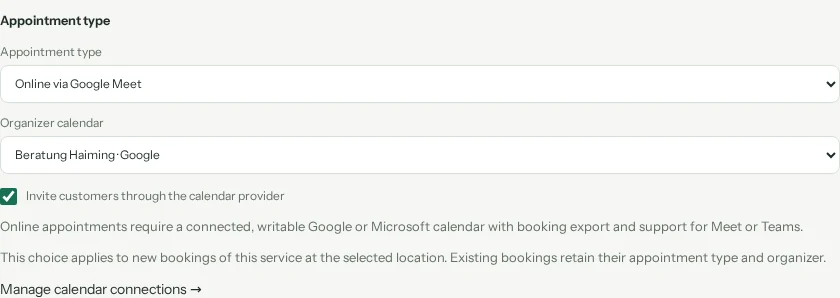
Connect your Google or Microsoft calendar and enable booking export. In the service settings, choose Google Meet or Microsoft Teams as the appointment type and select a suitable organizer calendar. Set the duration, availability and confirmation rules.
Let customers book a suitable time
Share your booking link or embed the widget on your website. Customers choose the online service and an available time. The appointment type is shown during booking. With manual approval, you review the request first; a pending request does not create a meeting.
Confirm and join through the meeting link
Once confirmed, the appointment is exported to the connected calendar. Google Meet or Teams provides the joining link. Customers find it in the email notification and on their protected appointment page. Rescheduling and cancellations are synchronized with the provider event.
What to set up first
- A connected, writable Google or Microsoft calendar with booking export enabled and support for Meet or Teams.
- An eligible provider account: Microsoft must allow Teams online meetings, and Google must allow conference creation.
- An online service with the right organizer, duration and booking rules. Staff calendar assignments and permissions must match.
- A test booking to check confirmation, the meeting link, rescheduling and cancellation before offering the workflow to customers.
Which plan fits?
Choose your QORLYNT plan based on booking volume, contact numbers and the team features you need. The pricing page shows current allowances. Required Google or Microsoft licences are not included in your QORLYNT subscription. Additional WhatsApp communication may incur provider charges.
Compare plans and allowances →What to know before starting
The video conference takes place in Microsoft Teams or Google Meet. QORLYNT handles booking and the calendar connection. Provider permissions, account settings and connection status must be suitable; a missing meeting link means the setup still needs checking. Changing a service’s appointment type applies to new bookings. Existing bookings retain their appointment type and organizer.
Frequently asked questions
Can I offer on-site and video appointments together?
Yes. Create separate services such as On-site consultation and Online consultation. Each service has its own appointment type at the selected location and a suitable organizer for online appointments. Customers choose the service; they do not freely switch the appointment type for each booking.
Is the Teams or Google Meet link created automatically?
Yes. For confirmed online appointments, QORLYNT requests the link from the provider through the configured calendar. Requests awaiting approval do not create a meeting. Link creation can take a little time; a link that becomes available later is sent afterwards.
Can I send the meeting link through WhatsApp?
Yes, with a connected channel and a suitable confirmation template containing the meeting_link or online_termin field. WhatsApp templates must be approved; consent and delivery rules still apply. Automatic WhatsApp link delivery is not assured without this setup.
Do my customers need a QORLYNT account?
Customers do not need a QORLYNT account for public booking. Any sign-in or app requirements for joining the video appointment depend on Microsoft or Google and the organizer’s settings.
What happens when an appointment is rescheduled or cancelled?
QORLYNT updates the existing provider event when rescheduling and removes it on cancellation. Check synchronization status if the connection fails. A new booking after cancellation receives a new meeting identity.